My brother is planning an online course, the kind with branching scenarios, short videos, a workbook and a final project. Before committing to a platform he asked ChatGPT whether AccessNow LMS, my free WordPress LMS plugin, could run it. The answer was fair: the basics are fine, but “embedding an interactive activity is not the same as tracking it.” This is how that one sentence became version 1.2: H5P activities that a lesson can wait for, plus the smaller things we found along the way.
Half of the review was already true
The review only had the public pages to go on, so the first job was checking it against the code. Lessons are written in the normal WordPress editor, which means anything that works on a WordPress page already works in a lesson, H5P included. So “can it show interactive content?” was already yes. The real gap was the other half: a student could scroll straight past a scenario and press Mark This Lesson As Complete, and nothing would know.
We decided three things that afternoon. Tracking H5P would go in the free plugin, because it is small, rare in free course plugins, and squarely about one person teaching. Hand-marked assignments, the bigger gap for his final project, moved up the paid version’s list. And before writing any code we would build a small sample course with real H5P activities on a throwaway site, to find out what actually breaks.
What the sample course found
Six lessons: a video, an interactive presentation, a branching scenario, a workbook and a quiz. It found three things worth knowing before building anything.
- H5P only remembers a student’s latest attempt. Each try overwrites the last, so a student who passes and then plays again for fun would lose the pass. The plugin had to keep each student’s best score itself.
- H5P activities are placed by number. There is no H5P block, just a shortcode with the activity’s ID. Asking people to type IDs is asking for mistakes, so the setting became a list of your activities by name.
- Phones were cramped. The theme already keeps 30 pixels clear on each side, and the plugin added 20 more of its own. On a typical 390-pixel phone that left 290 for the lesson, and presentation slides became hard to read. That fix went in first.
One trap cost real time. I built the demo activities by script rather than clicking through H5P’s editor, and the presentation crashed on load with an unhelpful error. It turned out H5P expects its social-sharing settings to exist even when sharing is off. Fill them in and it loads.
A button that waits, then wakes up
Each lesson now has a Required H5P activity setting with an optional minimum score. If no activity is placed in the lesson text, it is added at the end, so choosing one is the only step.

We had a choice about what happens when a student finishes: complete the lesson for them, or let them press the button. We kept the button. Students already press it after passing a quiz, and a lesson can have both a quiz and an activity, so one consistent rule is easier to understand. What changed is that the button is greyed out with a note saying what’s left, and it switches on the moment they finish, without reloading the page. H5P announces inside the page when an activity is finished; the lesson listens for that, waits a moment for the score to be saved, and asks the site whether the lesson can now be completed.
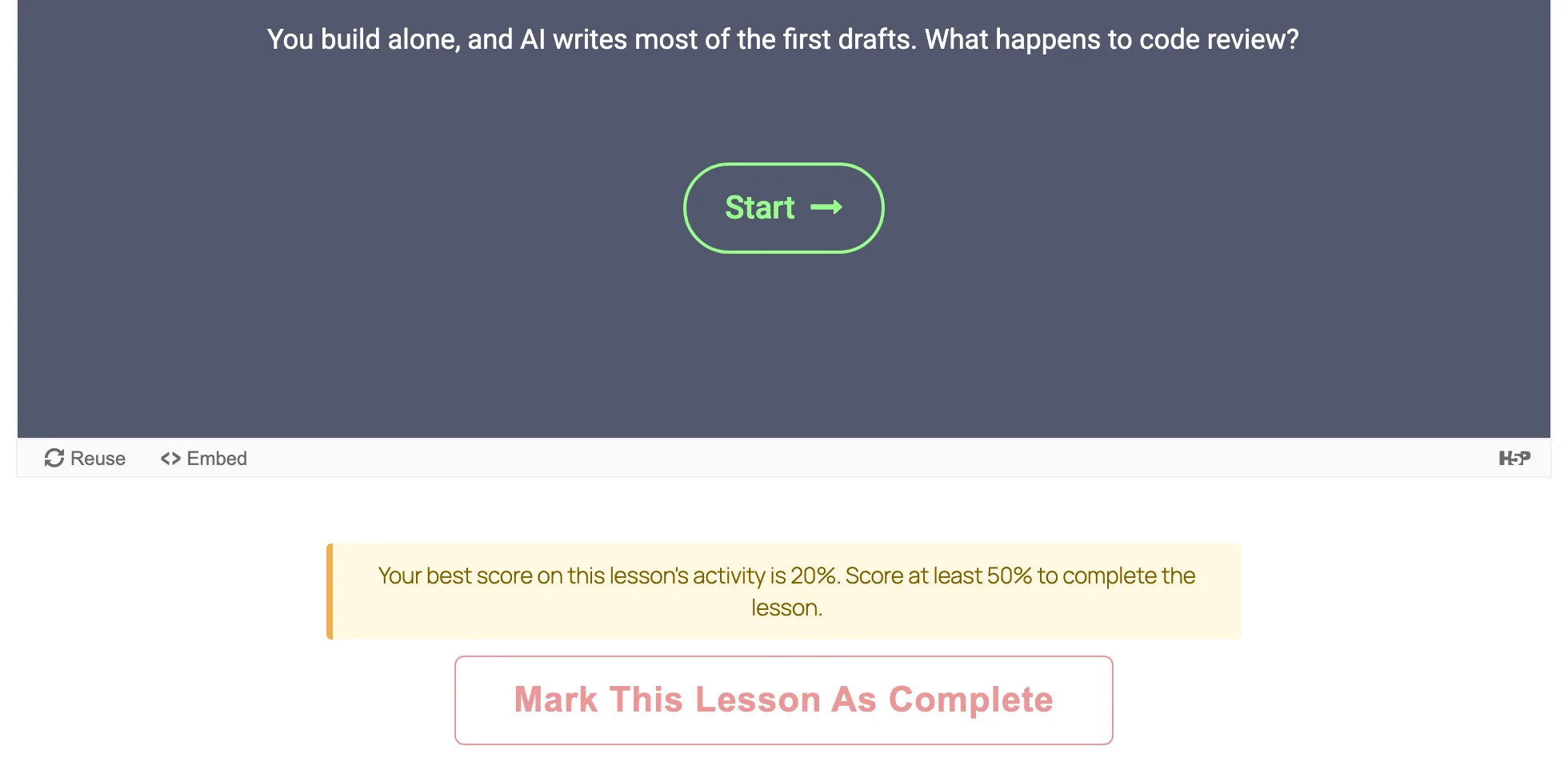
Most of the work was in the edges, so nobody gets stuck. If H5P is turned off or the activity is deleted, the lesson stops waiting. A student who finished the activity before the requirement was added gets the credit. Cloning a course keeps the requirement. Copying a course to another site drops it, because the activity will have a different number there, and the import says which lessons to reconnect. There are 29 automated checks for this part alone.
Lessons that don’t all look the same
The review’s other worry was that every lesson would be a page of text and a video. With the main feature done, three smaller roadmap items fitted the same release. Video lessons can now be Vimeo or a file from your own media library, not just YouTube. Students no longer see WordPress’s black toolbar, which only offered them a dashboard they don’t need. That is on for new sites only, so an update never changes a site behind its owner’s back. And there are four ready-made lesson layouts: a scenario with the outcome hidden until the student opens it, a worked example, a reflection question and a workbook task.
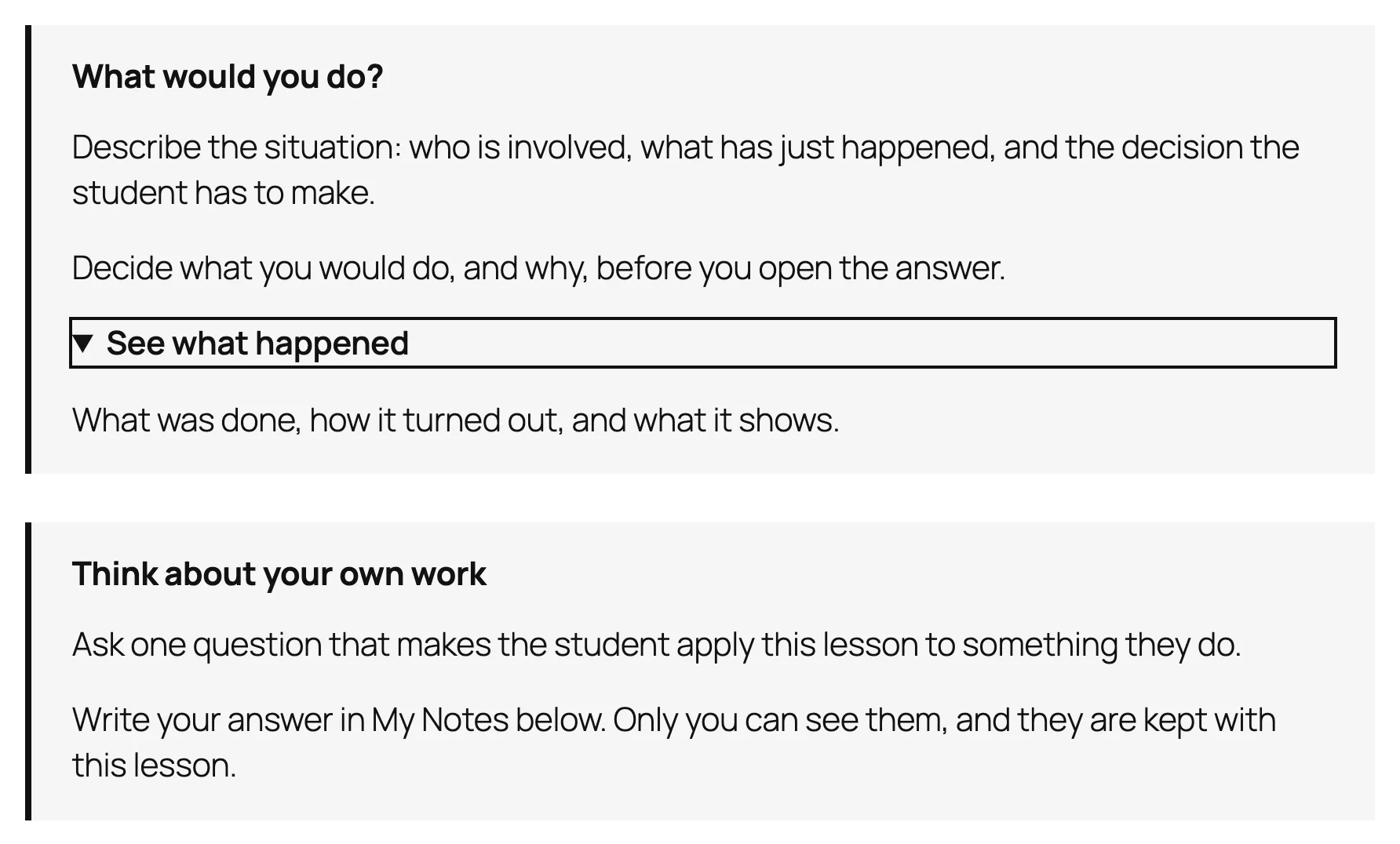
They are ordinary WordPress blocks in a shaded box. My first version looked wrong: the boxes came out as a narrow column pushed to one side, because they inherited a width setting meant for whole pages. Plain blocks with no layout of their own fixed it, and they stay as they are if the plugin is ever removed.
The oldest supported WordPress found two bugs
Every release is tested on the oldest WordPress it supports, which for this plugin is 6.3 from 2023. Everything passed on the current WordPress. On 6.3, two things failed. The new layouts’ “reveal” boxes showed as broken in the editor, because older WordPress reads their label from a different place. Writing the label in both places fixed it. The second bug was older: on 6.3 with a modern block theme, course pages were missing the site’s header and footer, because older WordPress needs to be told which theme they belong to. It had been that way for some time, and it is fixed now, which is the best argument I know for testing the old versions you claim to support.
How it turned out
One week from the email to the release: 381 automated checks passing on the current WordPress and 352 on 6.3, no accessibility violations on any screen we changed, and all 46 new phrases translated into Japanese. When I re-checked the competition for the comparison table, LearnPress was the only big course plugin with its own H5P add-on (US$29). The others need a paid add-on or don’t say. In AccessNow LMS it is free.
My brother’s course can now start on the sample site. If you want to try it yourself, AccessNow LMS is on WordPress.org, the release post covers what’s new, and Interactive lessons with H5P shows how to set it up. More is on the project page.