AccessNow LMS is a free WordPress LMS plugin for running online courses on your own site. Version 1.2 is about interactive lessons: put an H5P activity in a lesson, such as a branching scenario, an interactive video or a drag-and-drop, and the lesson can wait until the student has actually done it, with a minimum score if you want one.
Get 1.2 from AccessNow LMS on WordPress.org, or in your site’s admin under Plugins → Add New, searching for “AccessNow LMS”. Sites that already have it will be offered the update.
Lessons that wait for an H5P activity
H5P is a free plugin that makes interactive content: scenarios where each choice leads somewhere different, videos that stop to ask a question, presentations with quizzes in them. You could always put one in a lesson. What you couldn’t do was tell whether anyone had done it: a student could scroll past it and press Mark This Lesson As Complete.
Now each lesson has a Required H5P activity setting. Choose the activity, and optionally a minimum score. Until the student finishes it, the button is greyed out with a note saying what’s left. The moment they finish, it turns on, without reloading the page. A student who scores below the minimum is told their best score and what they need, and can try again.
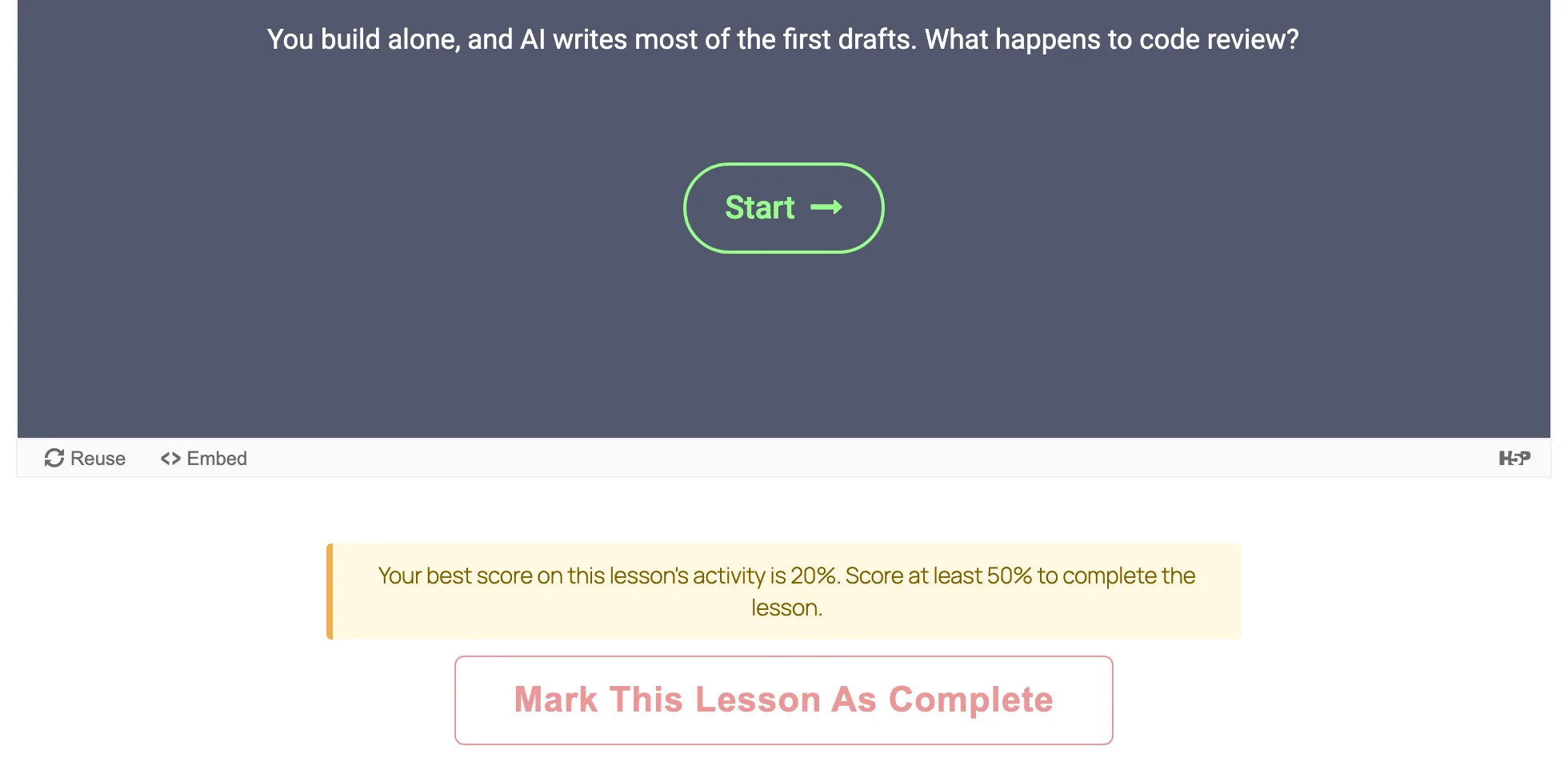
Their best score counts. H5P itself only remembers a student’s latest attempt, so someone who passes and then plays again for fun would otherwise lose the pass; AccessNow LMS keeps the best one. Each student’s score shows in Reports. If H5P is turned off, or the activity is deleted, the lesson simply stops waiting, so nobody is ever stuck. Interactive lessons with H5P walks through it.
Vimeo, and videos from your own site
A video lesson used to mean YouTube. It can now be a Vimeo address, or a video file you upload to your media library: press Choose from Media Library on the lesson and pick it. A file plays in WordPress’s own player, with no outside service involved.
Ready-made lesson layouts
When every lesson is a page of text and a video, a course starts to feel like a textbook. In the lesson editor, Patterns → AccessNow LMS now offers four layouts to fill in: a “what would you do?” scenario with the outcome hidden until the student opens it, a worked example, a reflection question answered in the student’s private notes, and a workbook task. They are ordinary blocks, so you can change anything in them. Build your first course lists them.
A cleaner look for students
Logged-in students no longer see WordPress’s black toolbar across the top of every page, which only offered them their profile and a dashboard they don’t need. It’s a setting, on for new sites. If you’re updating, nothing changes until you tick Hide the toolbar from students in the settings. Anyone who can edit content keeps the toolbar.
Two fixes as well: on phones, course and lesson pages no longer add their own side margin on top of the theme’s, which gives embedded activities noticeably more room, and on WordPress 6.3 with a block theme, course pages show the theme’s header and footer again.
How a review of the plugin for my brother’s course turned into this release, and the bugs we found on the way, is in Tracking H5P activities in a free WordPress LMS.
Get it
Update from your Plugins screen, or install AccessNow LMS from WordPress.org. Your courses, students and settings carry over as they are. More about the plugin is on the AccessNow LMS project page.