Pressmark is a free Chrome extension that shows Markdown files as formatted pages, lets you edit them in place, and saves copies as HTML, EPUB or PDF. Version 1.3 adds maths and diagrams in Markdown: formulas are typeset and Mermaid diagrams are drawn right in Chrome, in your theme’s colours, with nothing sent anywhere. It also brings a much better editor, footnotes and emoji, copying as rich text, and a smaller Lite edition for anyone who doesn’t need the maths.
Get 1.3 from the Pressmark project page. It’s a zip you install by hand for now, which takes about two minutes; a Chrome Web Store listing is on its way.
Maths and diagrams, drawn where you read
Write a formula between dollar signs, $e^{ipi} + 1 = 0$, and Pressmark typesets it in the line. Two dollar signs, or a ```math block, give it a line of its own. Prices are left alone: “$5 and $10” stays as written. A formula with a mistake shows its source underlined, and hovering over it says what’s wrong.
A ```mermaid block becomes a diagram: flowcharts, sequence diagrams, Gantt charts, pie charts, mind maps and the rest of what Mermaid can draw. Diagrams take their colours from the theme you’re using and redraw when you switch themes. Hover over one for SVG and PNG buttons that save it as a picture for a slide or a document.
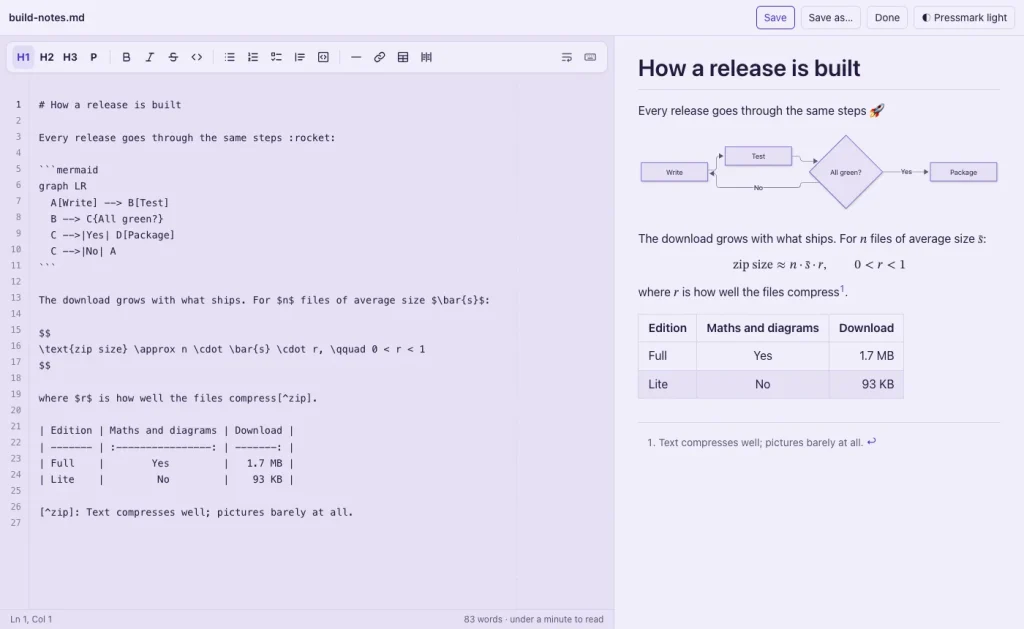
The libraries that do the drawing, Mermaid and the KaTeX maths it includes, ship inside the extension and only load on a page that has a diagram or a formula. Pressmark still makes no network requests, so your files stay on your computer. Exports keep the drawings too: diagrams go into HTML, EPUB and PDF copies, and formulas stay real maths rather than pictures.
Footnotes and emoji
Footnotes written the GitHub way, [^1] in the text and [^1]: The note. anywhere below, are numbered and listed at the end of the page, each with a link back to where it was used. GitHub’s emoji shortcodes work as well: :tada: shows 🎉, from the same list of nearly two thousand that GitHub uses.
A Markdown editor that’s easier to work in
Editing got most of the attention in this release:
- Line numbers, and long lines wrapped at 80 characters with a faint guide at that column. You can choose 72, 100 or 120 instead, or the width of the pane. Wrapping only changes the view; the file is saved exactly as you typed it.
- A divider you can drag between the editor and the preview. Pressmark remembers where you left it.
- Find and replace (⌘F and ⌘⌥F, or Ctrl+F and Ctrl+H), with match case, whole words and regular expressions, and go to line with Ctrl+G.
- A status line with the line and column, the words selected, and the document’s word count and reading time.
- Scroll sync: the preview follows the editor to the same section, and the other way round.
- Unsaved changes are kept. If the tab closes or crashes, the next time you open the file Pressmark offers your changes back.
- Line up table columns: one button pads a Markdown table’s cells so the pipes line up, keeping each column’s alignment.
- Paste a web address over selected text to turn it into a link.
Copy as rich text
Save as → Copy as rich text copies the page formatted, ready to paste into an email, Google Docs, Word or Slack: headings, tables, coloured code and all. Select part of the page first and it copies just that. Diagrams go across as pictures, and anything that only understands plain text gets the original Markdown.
Dark themes print light
Reading in a dark theme no longer means printing, or saving a PDF, with a black background. Pressmark switches to the light theme of the same pair for printing, diagrams included, and back again afterwards.
Pressmark Lite: everything but the maths
Drawing diagrams takes a large library, and it makes the download 1.6 MB, where Pressmark 1.1 was 54 KB. If you never write formulas or diagrams, Pressmark Lite is the same extension without them: a 93 KB download, with maths and Mermaid blocks shown as their source and everything else the same. Both editions are version 1.3.0 and come from the same code. Install one or the other, not both: only one of them can show a file.
How Pressmark started, as a Markdown viewer that grew into an editor in one evening, is in Building Pressmark, a Markdown editor for Chrome.
Get it
Download Pressmark 1.3, or Pressmark Lite, from the Pressmark project page, which also has the install steps. It works in Chrome, Microsoft Edge, Brave and Arc, on Mac, Windows and Linux. If you installed an earlier version by hand, replace its folder with the new one and press the reload icon on its card in chrome://extensions.