


Sandra and I run Sunshine Coast Karate, a karate school in Maroochydore. For years its website was built with Thrive Themes, and by the time we started this rebuild it ran on 15 active plugins. This is the honest story of moving off a page builder: rebuilding the site as a custom block theme with a few small plugins, keeping every address search engines know about, and launching it with Site Replica Pro on 4 October 2026. It covers what we found, what we replaced, the traps that cost time, and how launch day works.
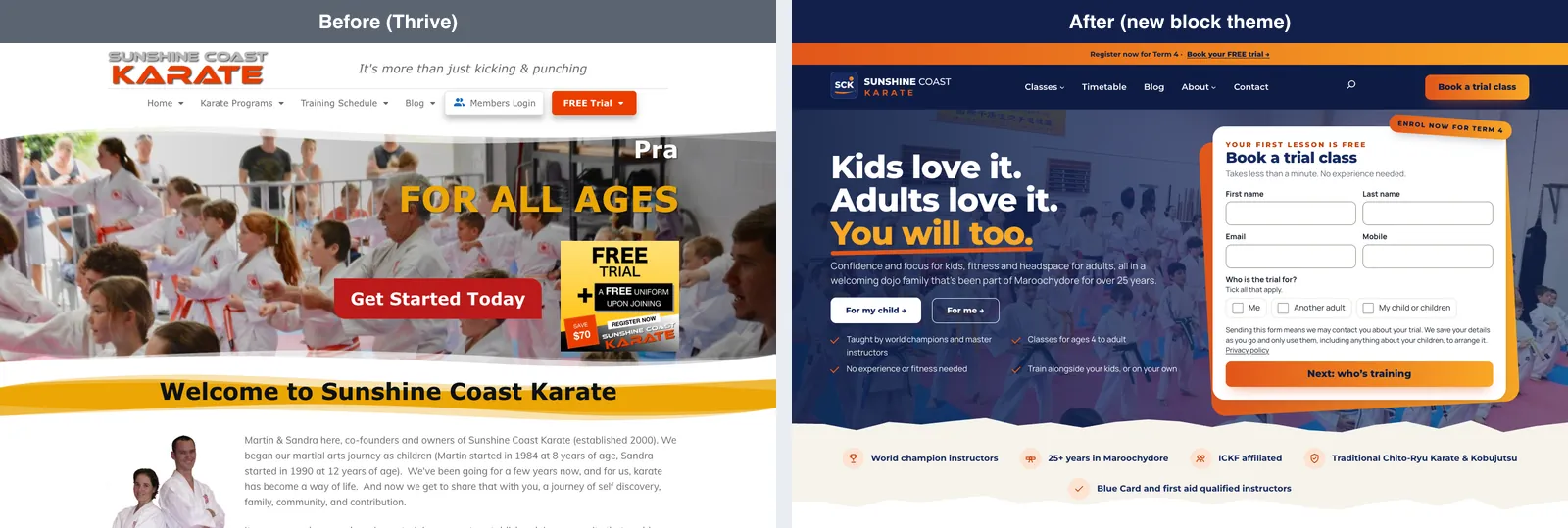
Where we started
The first job was an audit, done read-only before anything changed. The site had 1,830 published posts, 58 published pages and 2.8 GB of uploads. The theme was Thrive Theme Builder and every page was built with Thrive Architect. Three other Thrive products, Leads, Ultimatum and the A/B testing plugin, were installed but not doing anything: no campaigns, no tests, empty tables.
The free trial form was the dojo’s only real source of new students, and it was Contact Form 7 with two add-ons. Every booking went to email and nowhere else, so one failed email meant one lost enquiry.
It was also slow. Lighthouse on the live site (mobile) scored 55–57 for performance, with the largest content taking 7.7–14.3 seconds to appear against a 2.5-second target. The causes were the usual ones: 235–350 KB of inline CSS and about 30 render-blocking files from the page builder, plus a server with no compression that took 750–860 ms to start answering.
Why you can’t just switch the theme
This is the part most people find out too late. 46 of the 58 pages were Thrive “landing pages”, which ignore the theme completely. Their real content lives in Thrive’s own fields, and the normal page content WordPress keeps is a plain-text copy that leaves out the buttons, FAQ toggles, forms, maps, videos and countdowns. If Thrive had been switched off, 34 pages would have lost their header and menu, 31 their call-to-action buttons, 16 their FAQs (including the home page and every program page) and 6 their forms.

So the new theme couldn’t be switched on until every one of those pages had been rebuilt. Before you move off any page builder, find out where it stores your content and what is left if you deactivate it.
Rebuild in place, not a new site
We worked on a local copy of the site on my Mac, and rebuilt each page in place: the same page, with the same ID and the same address, given new block content. Thrive kept showing its own version until launch, while a small local-only preview plugin showed the new theme on top. That meant no new URLs to redirect and no menus to rewire, and the old Thrive version of each page was checked to be unchanged, word for word, so visitors saw the old site intact until launch.
Here is one program page at the same address, before and after:

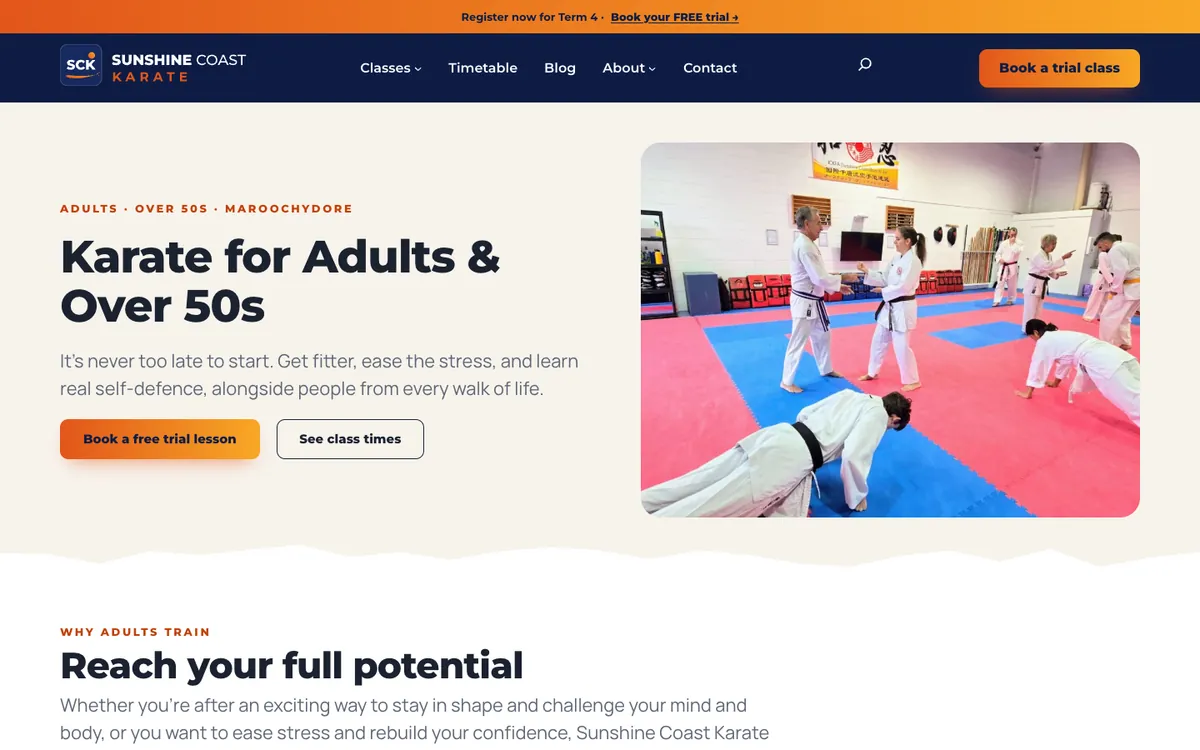
The look is Sandra’s design: Montserrat and Manrope type, navy with a sunrise gradient, and the dojo’s own photos. It is a full block theme that does presentation only. The colour palette, type sizes and spacing are locked, so nothing off-brand can be picked by accident; the range of looks comes from section styles and patterns instead. There are 27 patterns, from heroes and testimonial sliders to complete home, program and campaign pages, and a synced pattern with overrides took over from Thrive’s global “symbols”. Building a new campaign page from the patterns takes a few minutes.
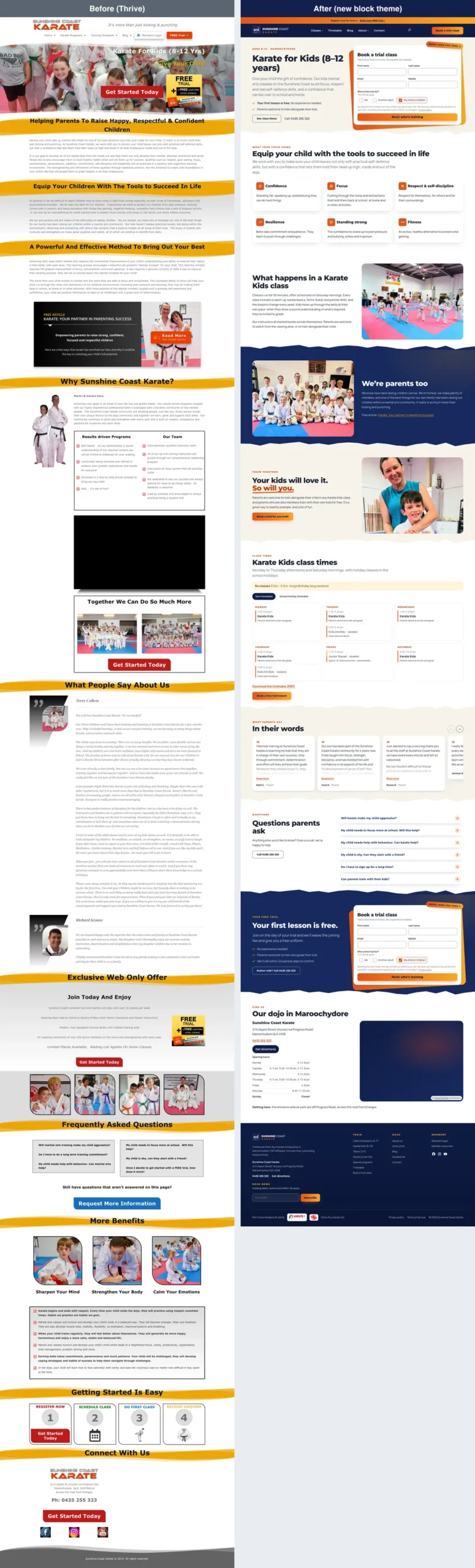
Everything that is content rather than presentation (locations, classes, instructors, testimonials, FAQs) lives in a plugin, so it survives a future theme change. Core blocks came first; custom blocks were written only where core has nothing, such as the timetable, testimonials and a countdown.
Five small plugins instead of eleven
Each replaced plugin was mapped to what took over its job:
| Switched off | Replaced by |
|---|---|
| Thrive Architect and Theme Builder | The block theme, core blocks and the sck-blocks plugin |
| Thrive Ovation (testimonials) | A testimonials type in sck-core, with consent holds |
| Thrive Leads | Lead boxes in sck-leads |
| Thrive Ultimatum | A countdown block |
| Thrive Optimize (A/B testing) | Split testing in sck-stats |
| Contact Form 7 and two add-ons | sck-leads |
| Redirect Redirection | sck-redirects |
| Hide Admin Toolbar | sck-core |
Eleven plugins were switched off on launch day, and the push removes two more: WishList Member, a membership plugin the site no longer used, and an old release of my image optimiser. That takes the site from 15 active plugins to nine: All in One SEO, AccessNow Image Optimizer, Site Replica, Spam Eater, and the five small SCK plugins. The theme and each plugin has its own page in our projects directory.
- sck-core holds the content types, the business name, address and phone (typed once, shown everywhere), the settings and the structured data for search engines.
- sck-blocks adds eight blocks and the pattern library.
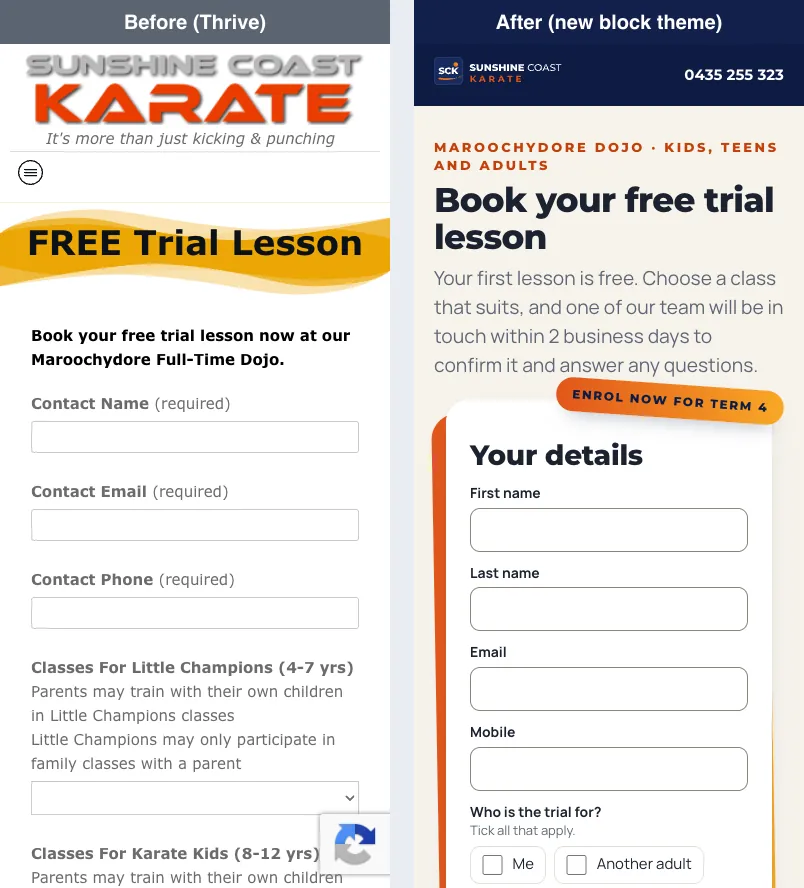
- sck-leads runs the booking and contact forms. Every booking is stored before it is emailed, so a mail failure no longer loses a student. The trial form now asks a child’s age, suggests the program, and offers only the classes that suit, with each class’s next date. No personal data ever goes into a web address.
- sck-redirects holds 697 rules for retired addresses. A rule only acts when the page would otherwise be a 404, so a redirect can never hide a live page, and it keeps a 404 log with no IP addresses.
- sck-stats counts visits and bookings with a script of under 1 KB: no cookies, no IP address and no browser details. It also replaces Thrive Optimize with split testing that picks its own winner, after at least 14 days, 200 visits per version and 20 bookings, at 95% confidence.
The free trial form, on a phone:
Where AccessNow’s own plugins came in
Three of the remaining plugins are mine, and each had a real job in this project.
Spam Eater protects the new forms instead of Google reCAPTCHA. The booking form asks Spam Eater whether a submission is spam, so there’s no puzzle for parents to solve and no Google script on the page. Without JavaScript, the form falls back to Spam Eater’s basic check plus a minimum time and a send limit.
AccessNow Image Optimizer replaced an early release of itself that the site had run for years. On the rebuilt site it keeps a backup of every original, caps images at 2,560 pixels wide and makes WebP copies, because the host doesn’t support AVIF. Most of the site’s images had no WebP copy before; now every size has one.
Site Replica did the launch itself, which has its own section below.
Cleaning up before the move
A rebuild is the cheapest time to clear out years of build-up, because everything gets checked anyway.
- The blog: 1,829 posts were sorted into a spreadsheet with their search clicks and a suggested verdict. 163 stay as they are; 980 are kept as history, out of the sitemap and marked noindex; 76 are set aside to merge later; 610 are retired, made private rather than deleted, each with a redirect. Apart from six slugs WordPress tidied up, which redirect, no post changed its address.
- Old posts converted to blocks: 452 classic posts, each compared word for word before saving.
- Dead images: 1,678 references to images that were already missing on the live site were removed from 607 posts.
- Size: 446 unused attachments (backed up first), revisions trimmed to the newest three per post, 65 tables left behind by old plugins, and 203 stale WishList member accounts. The database went from 93 MB to 76 MB, and uploads from 2.8 GB to 2.5 GB.
- Character encoding: the core tables were still latin1 from the site’s early days, so any character outside Windows-1252, such as an arrow, an emoji or Japanese characters, was quietly saved as a question mark. 70 tables were converted to utf8mb4, checked with checksums, and 450 double-encoded values from around 2011 were repaired first.
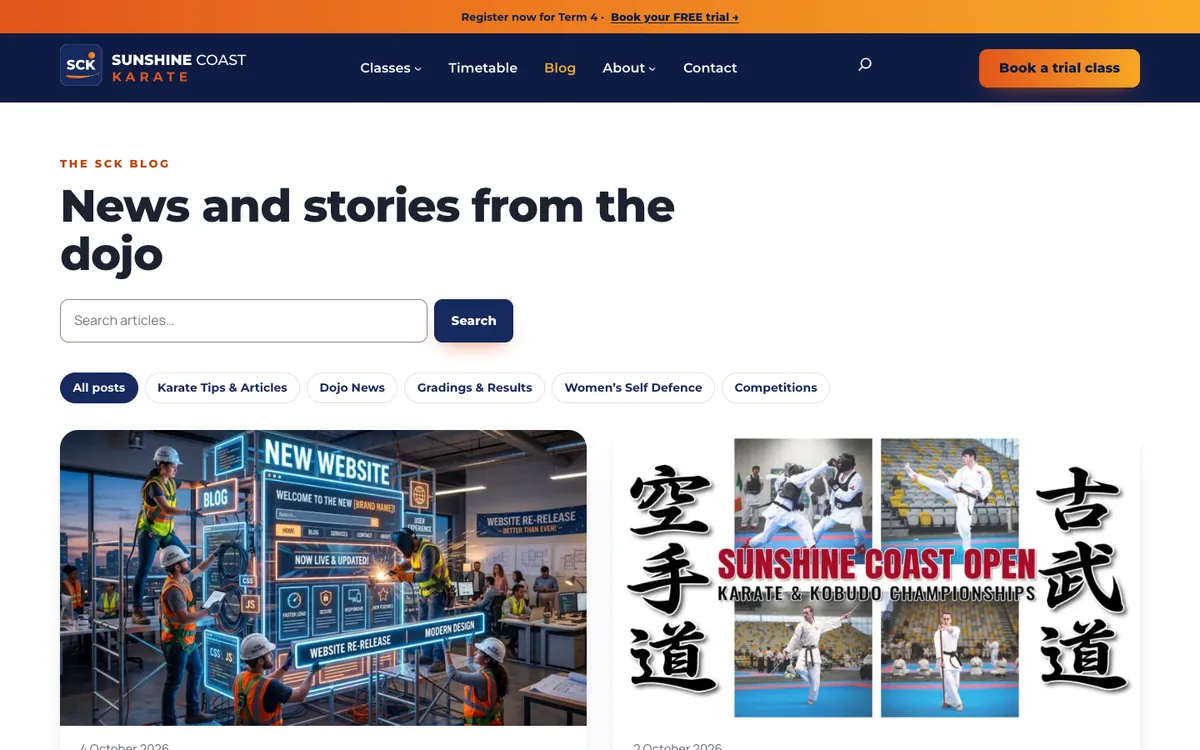
The blog listing, before and after:

One near miss is worth passing on. The media audit listed 23 old PDFs as orphans, attached to no page. Those 23 files earned 47% of the site’s search clicks. Before deleting anything as unused, check it against your Search Console data.
Not losing a single address
Search rankings belong to addresses, so the rebuild was measured against the old site URL by URL. A crawl requested all 3,511 addresses from the audit’s inventory on the rebuilt copy and compared each one with the live site’s answer: 1,550 load as before, 747 redirect to a page that loads, and most of the remaining 404s are attachment pages of deleted media with no search clicks, pages that were already 404 on the live site, or old PDFs we chose to delete (the ones with newer versions elsewhere now redirect there). Only three addresses that weren’t planned came back 404, and all three were already broken on live.
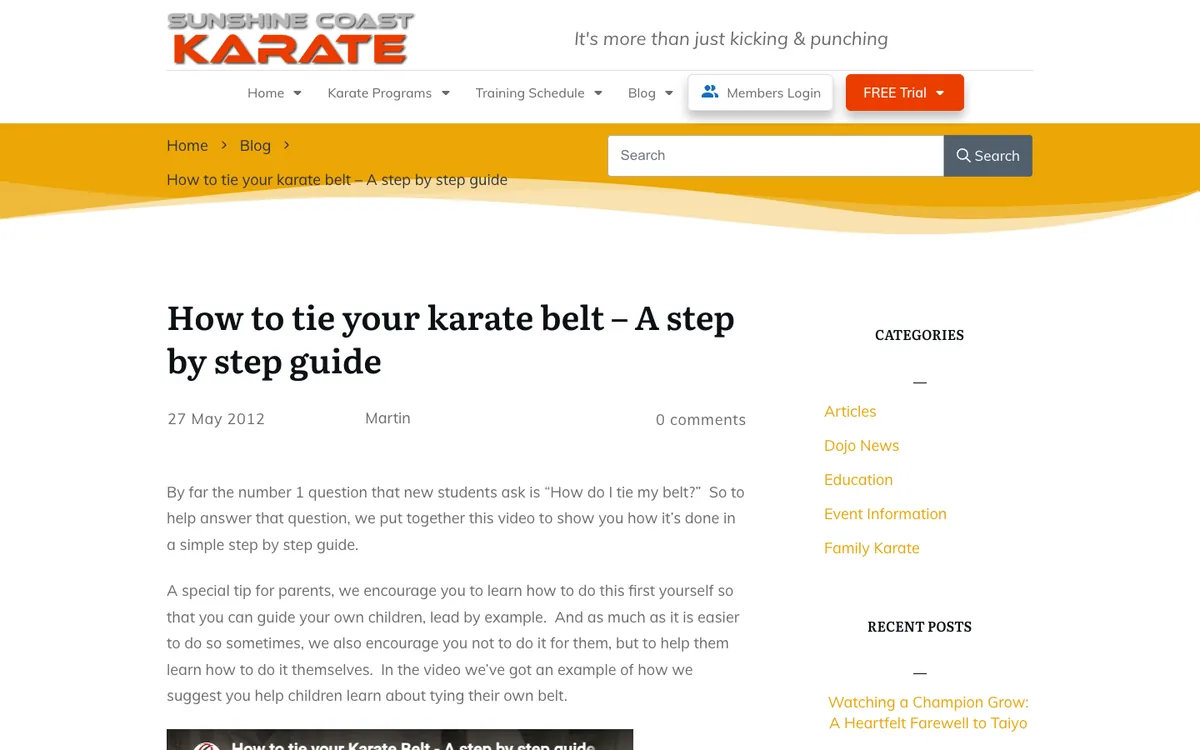
A post from 2012 shows what that means in practice: the same address, in the new design.
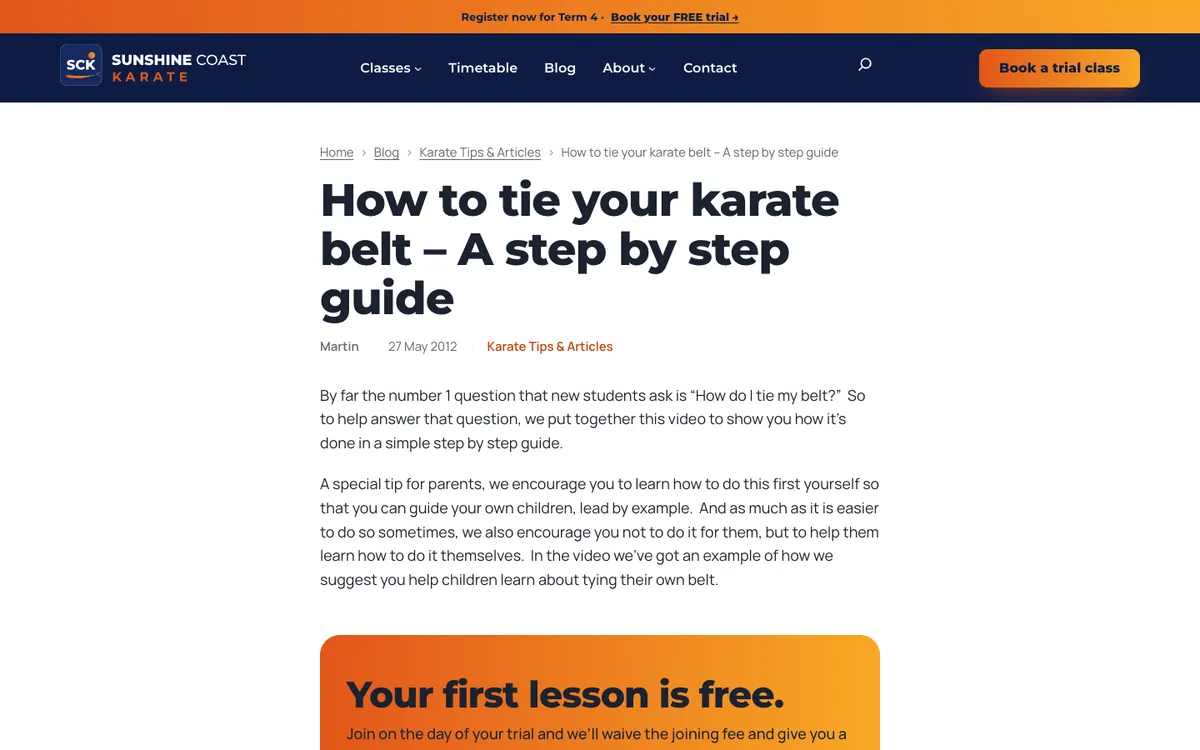
Titles and canonical addresses stayed the same. All in One SEO stays for now, and sck-core adds local business details, the logo and social profiles to its structured data, which the old site didn’t have.
The live server runs PHP 8.1 and my Mac runs a newer version, so code that works locally could still fail there. Every PHP file in the theme and plugins, 160 in all, is linted with a real PHP 8.1 in Docker before anything ships.
Traps that cost time
- Page templates reset while Thrive is active. Saving a page re-checks its template against Thrive, doesn’t find the new one, and quietly sets it back to Default.
- Patterns made of other patterns open locked. WordPress 7.1 inserts them as linked pattern blocks you can only edit text in, so a countdown’s date couldn’t be changed. Full-page patterns now include their sections directly.
- Don’t call a palette colour “text”. The slug generates a class with the same name WordPress gives every block that has a custom text colour, so every custom text colour on the site rendered grey.
- PHP notices on screen break redirects. Thrive’s deprecation notices, printed before the page headers, stopped every redirect from working on a test install. On the live site, error display must be off.
- WordPress’s built-in cron runs on a visitor’s request. Background work added about 0.6 seconds to a booking. A real cron job on the server now runs it instead.
Launching with Site Replica Pro
The launch is a push: the rebuilt local copy is sent to the live site with Site Replica Pro, and the live site keeps its own users and comments tables. Everything else, from pages and posts to settings, theme, plugins and media, comes from the copy. Live content is frozen on launch morning, and Site Replica’s “What changed” report lists anything the live site gained since the copy was made, so it can be re-created first. This morning it found nothing new to re-create.
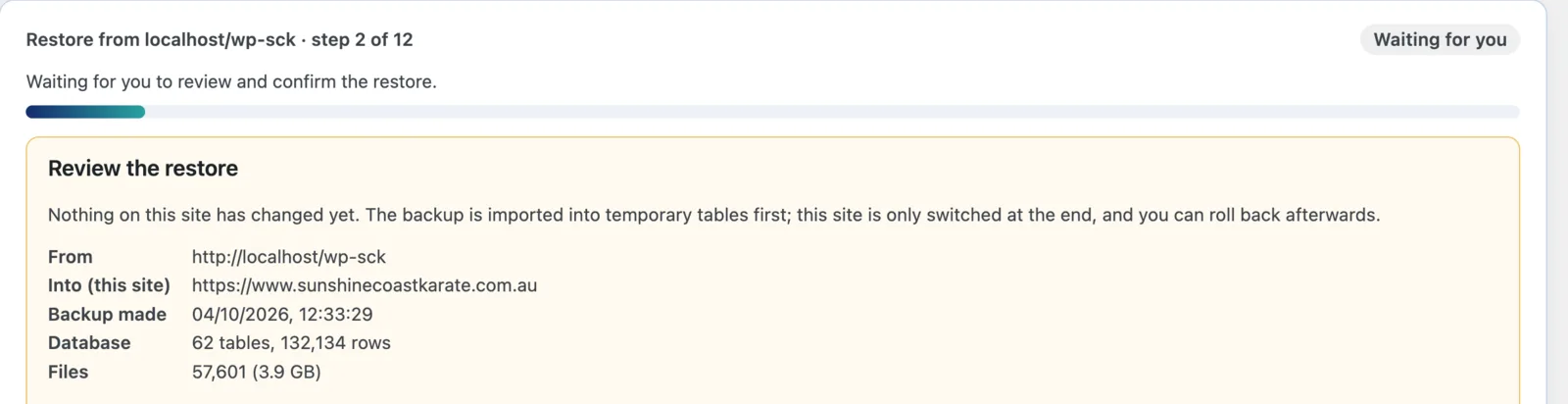
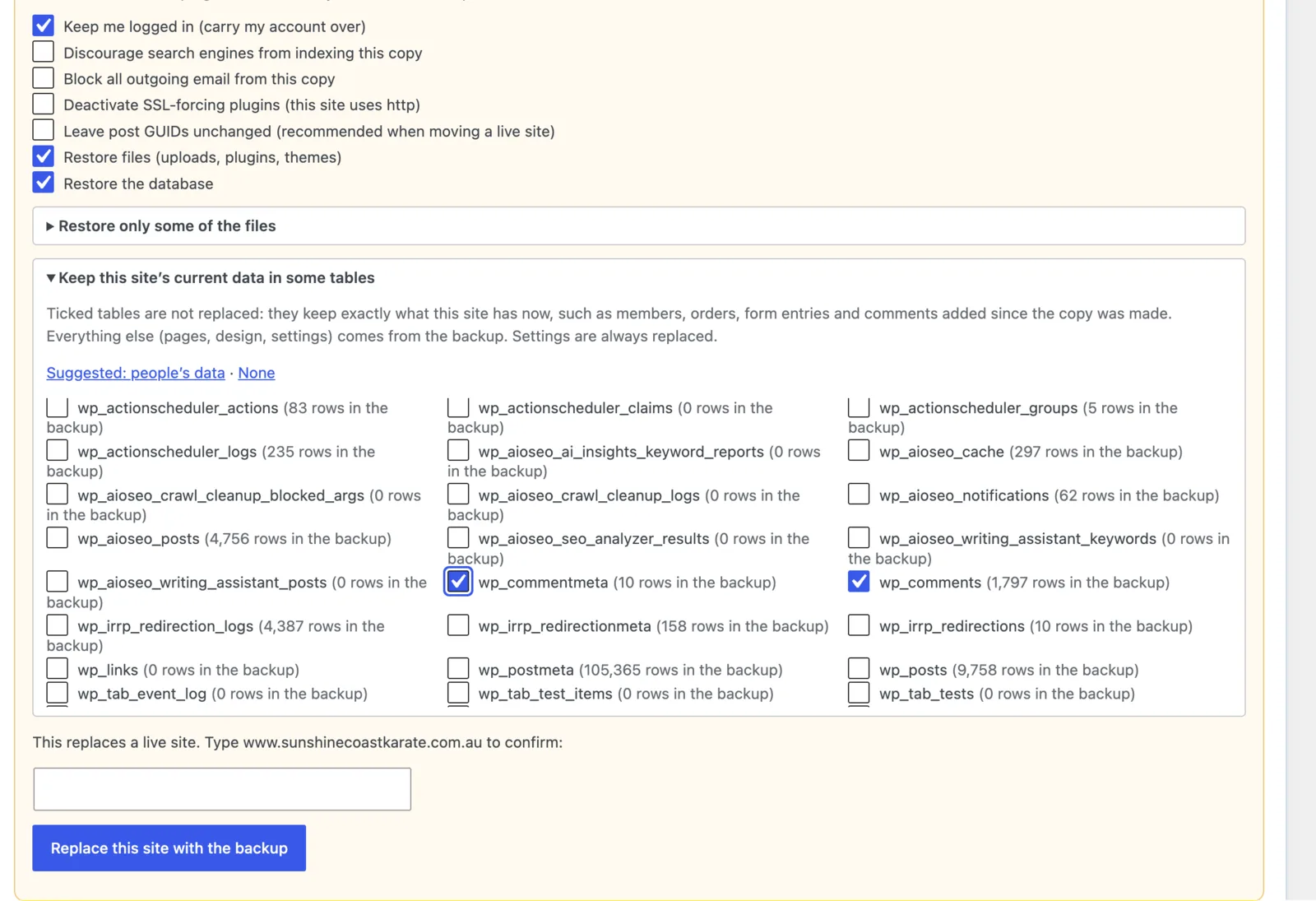
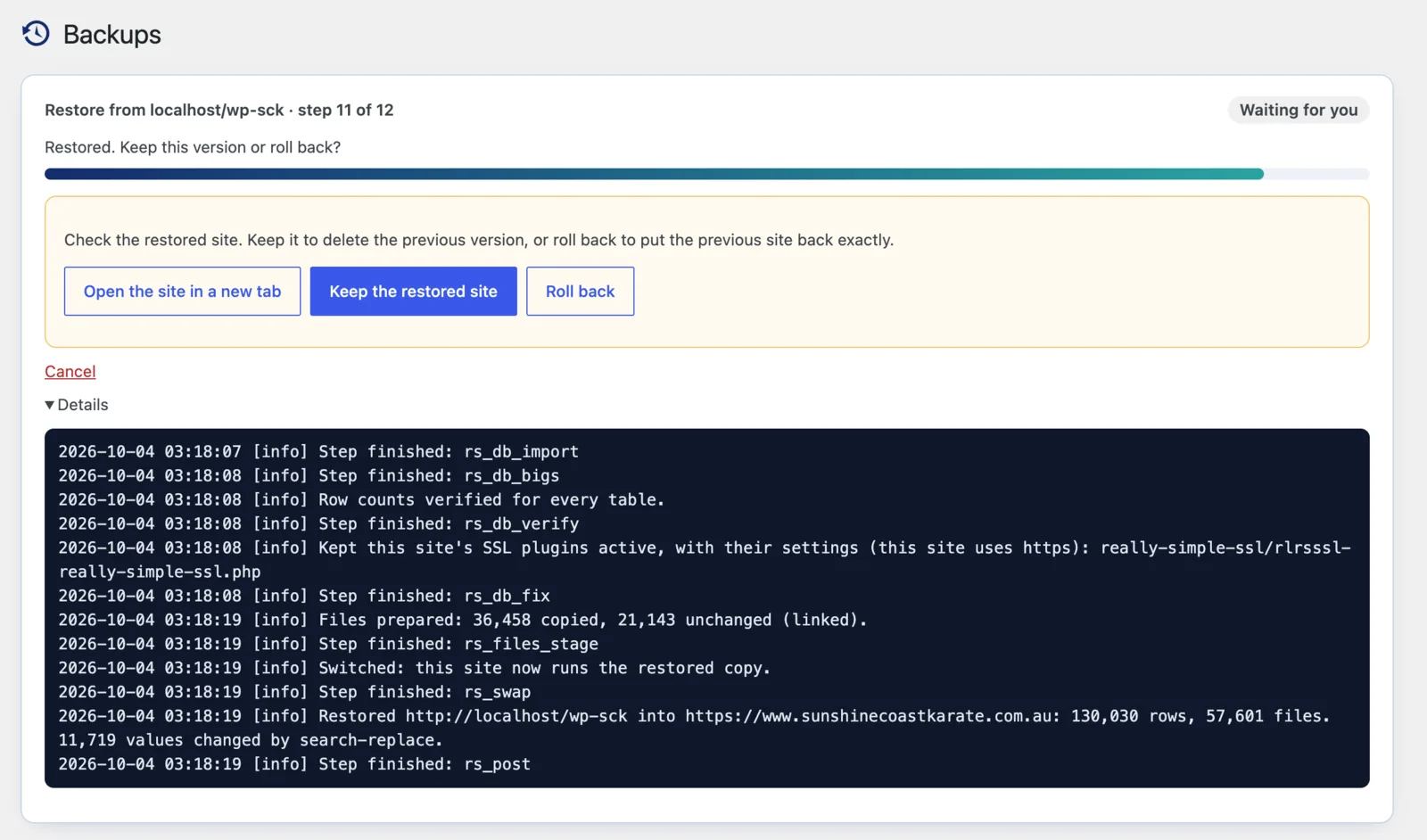
wp_users, wp_usermeta, wp_comments and wp_commentmeta. The suggested “people’s data” preset had also ticked old Thrive and scheduler tables.The restore is staged. The backup is imported into temporary tables while the old site keeps serving visitors, and only at the end are the new tables swapped in by renaming them. The old site is kept until someone presses Keep, so Roll back puts it back exactly as it was. Our rule is to decide within two hours. Only files the live site doesn’t already have, or that have changed, are sent.
The rehearsal
The day before, the whole launch was rehearsed into a throwaway WordPress install on the same Mac. Backing up the rebuilt site took 94 seconds, sending 3.2 GB to an empty site took 4.5 minutes, the restore took 65 seconds and Roll back took 8. More useful than the timings were the things it showed the written plan had wrong:
- A push carries the active theme and plugins exactly. The first restored site came out on Thrive, with the old forms. The new theme has to be switched on and the old plugins switched off on the copy before it is backed up.
- Must-use plugins are sent too. The local preview plugin would have gone to live, so it was moved out first.
- Only a full restore removes plugins the live site has and the copy doesn’t. Untick any part and it becomes a partial restore, which would have left the old image optimiser and WishList Member behind.
- Roll back never touches the tables you keep. That’s the point of keeping them, but it means changes to them can’t be undone by Roll back. Converting the users and comments tables to utf8mb4 and deleting the 203 stale accounts on live wait until after Keep.
- Read every restore option. “Leave post GUIDs unchanged” is on by default for a live site; left on, 1,476 posts created locally would have kept a localhost GUID.
- The receiving site needs an activated Pro licence, and because the restore replaces the options table, the licence record arrives from the copy. On live, choosing Migrate License sorts that out.
The disk quota
The site lives on a shared cPanel account with a 7.81 GB quota, about 3.8 GB of it free on launch morning. A full safety backup of the live site is about 3.5 GB, so keeping it on the server would have used almost all the free space before anything was sent. Instead the safety backup was pulled down to my Mac with the same connection used for the push, and it takes no space on the server. Before sending, the peak still has to fit: roughly twice the changed files, plus about three times the database, plus a margin. If your host is tight on space, do that sum before launch day, not during it.
Large sites on small hosting accounts are what Site Replica was built for; backing up a 3.4 GB site on hosting that fights you explains how it backs up in small pieces without filling the server’s disk. For the launch-day method in general, see how to push a staging site to live without losing orders, and the help articles on putting a redesign live and reading the restore plan.
What we’d tell anyone moving off a page builder
- Audit what the builder stores, and what is left if you switch it off, before you plan anything.
- Rebuild pages in place, at the same IDs and addresses, so there’s nothing to redirect.
- Count which plugins are actually doing something. Three of our Thrive plugins weren’t.
- Store form entries before emailing them.
- Crawl every address before and after, and check search clicks before deleting “unused” files.
- Rehearse the launch on a throwaway site, and fix the plan with what the rehearsal finds.
- Keep a way back that doesn’t depend on the server you’re changing, and check the disk space first.
How it went
We launched on Sunday 4 October, with the dojo closed for the long weekend. The push sent 862 MB: 36,458 files and the database. The 18,662 files the live site already had stayed where they were. It took nine and a half minutes, including two retries when the server was slow to answer. The restore then took a couple of minutes, and the site switched over in one step.
The checks took about an hour. We looked at every key page, made a real test booking and sent the contact form. We tried the redirects and the sitemap, then crawled all 3,511 addresses we know about. 3,487 behaved exactly as they had on the local copy, and none of the other 24 was broken. One thing we hadn’t caught: the Members login link pointed at a ClubWorx page that no longer exists. The theme now hides that link until there’s an address to show, so it comes back by itself when the new member system is ready. Then we pressed Keep.
- Speed: Lighthouse mobile scores of 94 to 100 on the home page, a program page and a blog post, up from 55 to 57. The main content now appears on a phone in 1.1 to 2.8 seconds, down from 7.7 to 14.3.
- Plugins: 15 active before, 9 now, and five of the nine are our own small plugins.
What we’d do differently:
- Plan the cleanup twice. A restore keeps media and tables that only the live site has. That’s the safe default, but it meant the 2,340 old files we’d deleted on the copy were still on the server. Clear them on live too, or do the cleanup there in the first place.
- Check old tables before converting them. Turning the kept users and comments tables into utf8mb4 failed on an index the Disqus plugin had left behind years ago. Dropping it fixed it, but it’s better found the day before.
- Look at the server, not just the pages. The pages are now so light that the slowest part is the server, which takes about a second to start answering. That’s half the home page’s time on a phone, so a page cache is next.
Site Replica is free on WordPress.org, for backups, restores you can roll back, and moving a site. Pushing a copy to a live site while it keeps its own data is part of Site Replica Pro. The Site Replica project page has the details.


